Your Server's Bot, Your Way
Give Lofi Radio a look that feels at home in your server. Set a custom name, avatar, banner, and bio so the bot blends seamlessly with your community's identity.
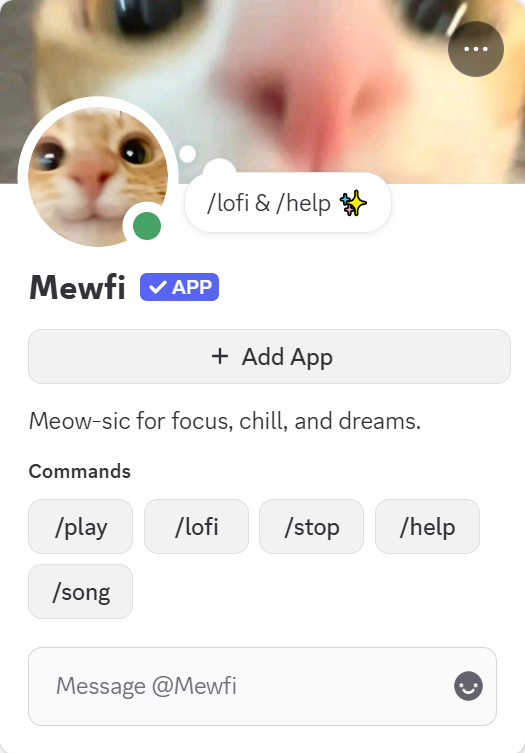
A Name That Fits
Rename the bot to match your server's personality. Whether it's "Chill FM", "Study Radio", or something entirely unique, the name appears in the voice channel, member list, and all bot messages.
Your Avatar, Your Touch
Swap in your own artwork or server mascot to tie the bot's look directly to your community's visual identity.
Set the Scene with a Banner
Give the bot a banner image that sets the mood. Show your server's artwork, seasonal vibes, or anything that makes the profile page feel intentional and alive.
One Setup, Always On
Configure it once and the bot keeps your branding forever. No need to redo it every time the bot restarts or updates.
Everything You Can Customize
Four simple settings. Endless personality. Hover over the indicators to explore each customization option.
Bot Avatar
Upload any image as the bot's profile picture. Use your server's mascot, logo, or seasonal art to give it personality.
Bot Bio
Write a short bio that appears on the bot's Discord profile. Set the mood, share a station tagline, or leave a note for curious members.
Bot Banner
Set a banner image that shows on the bot's profile. The perfect canvas for your server's artwork or current season's theme.
Bot Name
Rename the bot to anything that fits your server's theme. It shows in the member list, voice channel, and all bot messages.
Manager-Only Controls
Bot profile customization is restricted to server managers. This keeps your server's branding consistent and prevents unauthorized changes.
Set It Up in Seconds
Open Settings
Use /bot-profile as a server manager to open the bot configuration panel.
Customize Profile
Set a name, avatar, banner, and bio to match your server's style.
Done
The bot updates instantly. Your members will see the new look across all channels right away.
Explore More Features
See what else Lofi Radio can do for your server.
Radio Modes
Choose how Lofi Radio behaves in voice: session-based, smart auto-join, or always-on 24/7.
Sleep Timer
Set a timer and auto-disconnect from voice when time is up. Save battery, sleep peacefully.
Stations
Choose from curated lofi stations or create your own custom stations. Set schedules, run multiple stations, and craft the perfect atmosphere for your community.